

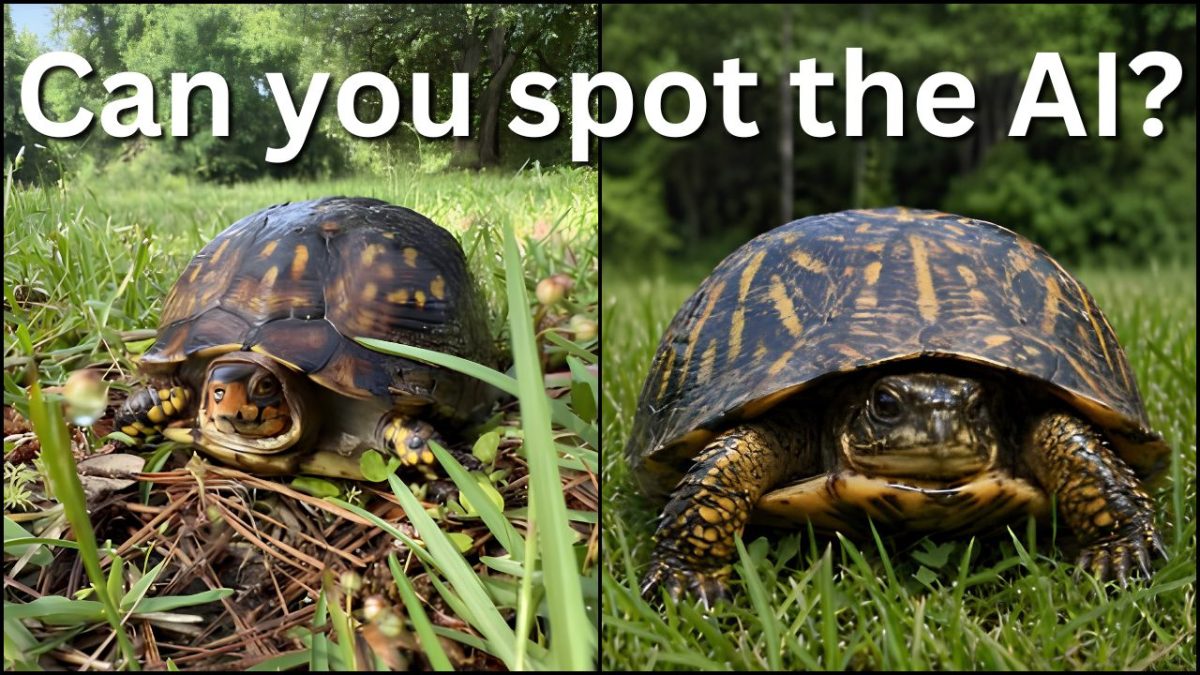
The Roy Howard Community Journalism Center’s “What Is True?” team asked the question, “How can I tell if content is AI-generated?”
RESULTS: What is true? More like what is real? The tips below have been verified as true.
AI has become increasingly popular and often appears on social media platforms such as Facebook and Instagram. To learn more about spotting real vs. fake content, read the full fact check below.
According to the Global Investigative Journalism Network, it used to be easier to spot AI-generated photos. For example, AI images would rarely accurately portray hands, often adding several extra fingers or combining fingers.
With advancements and user engagement, however, it has become much more difficult to tell which posts contain real content and which ones are AI-generated. Referring back to the hand example, newer AI models can now easily create anatomically correct hands.
NOTE: It’s important to remember that AI can generate both photos and text.
Capitol Technology University provides the following guidelines for spotting AI-generated text. AI-generated text often includes issues such as repetition, inconsistencies, quick responses and placeholder text. Examples include:
AI models struggle to produce text that flows like typical human writing.
Quick replies in places like customer service chatrooms can indicate an AI chatbot.
Placeholder text like “introduction here” can suggest the text was written with AI because AI often skips filling in that information if it isn’t fed that information by the user.
According to Capitol, you can tell the difference between AI-generated images and natural images through fine details. Newer AI models have gotten better at creating hands that look more realistic. However, AI images still have other issues, such as unnaturally smooth textures, warped backgrounds, unrealistic lighting and inconsistencies across the image. AI will also often use stereotypes when creating pictures of people.
Another organization, Kellogg Insight, provides more detailed tips to check for AI-generated images. Examples include:
Check whether the pupils are round or in an unnatural shape.
Check comparison photos. If you see an outrageous photo of a celebrity circulating, compare it with other photos of that person to look for inconsistencies.
Do a reverse image search to see where the image is from and what it has been used for in the past.
How to do a reverse image search, according to the Association of Internet Research Specialists:
Go to https://images.google.com/
Click the camera icon in or by the search bar.
Paste the URL or upload the photo in question.
Google will then give you matching websites and similar images. The AI search tool also may tell you whether the image is AI-generated.
About “What Is True?”
The RHCJC “What Is True?” team of graduate investigators examines everything from viral online posts to local community rumors. If you have a question, submit it to the “What Is True?” inquiry form on the RHCJC website or call 855-IS-IT-TRU (855-474-8878).


Darius • May 25, 2026 at 11:42 PM
The experience feels seamless and makes image analysis easier to approach.
Darius Bacani • May 25, 2026 at 8:35 PM
The AI Image Detector on Undetectable.ai provides a smooth experience and delivers results quickly.
Darius Bacani • May 21, 2026 at 10:28 PM
The AI Image Detector on Truthscan helps make image verification feel more convenient and efficient.
Darius Bacani • May 19, 2026 at 12:25 AM
What I like most about ImageDetector is how simple and easy the whole process is.